High-yield notes generator for dense lectures
Condense a dense lecture into notes linked to its pages.
See what gets generated
High-yield note
p. 3Bone and joint infection: name the compartment first
| Condition | Site | Local clue | Sample |
|---|---|---|---|
| Osteomyelitis | Site: Bone and marrow | Local clue: Bone tenderness | Sample: Bone or deep tissue |
| Septic arthritis | Site: Joint space | Local clue: Painful joint movement | Sample: Synovial fluid |
| Cellulitis | Site: Skin and soft tissue | Local clue: Skin warmth and redness | Sample: Clinical context |
Exam point. Early X-rays may be normal, so a normal film does not rule out bone infection.
Notes page
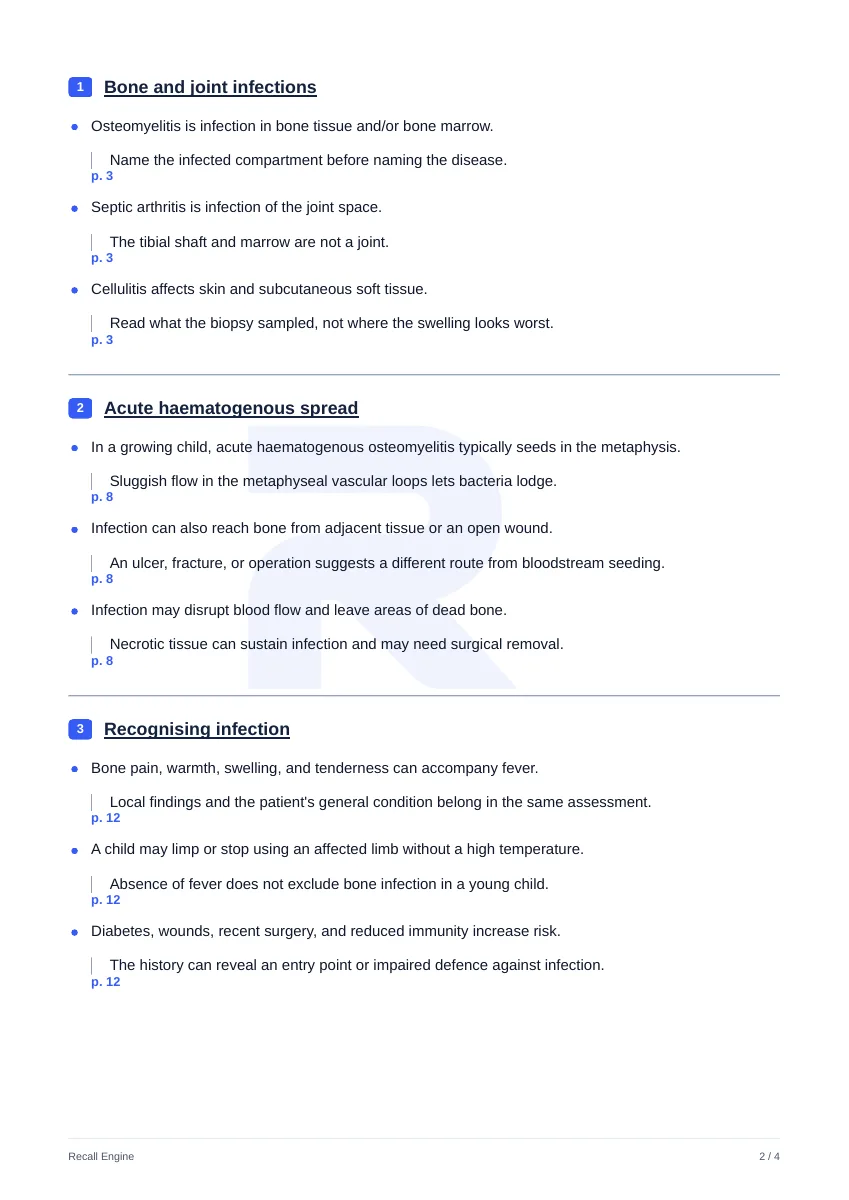
Reference sheet
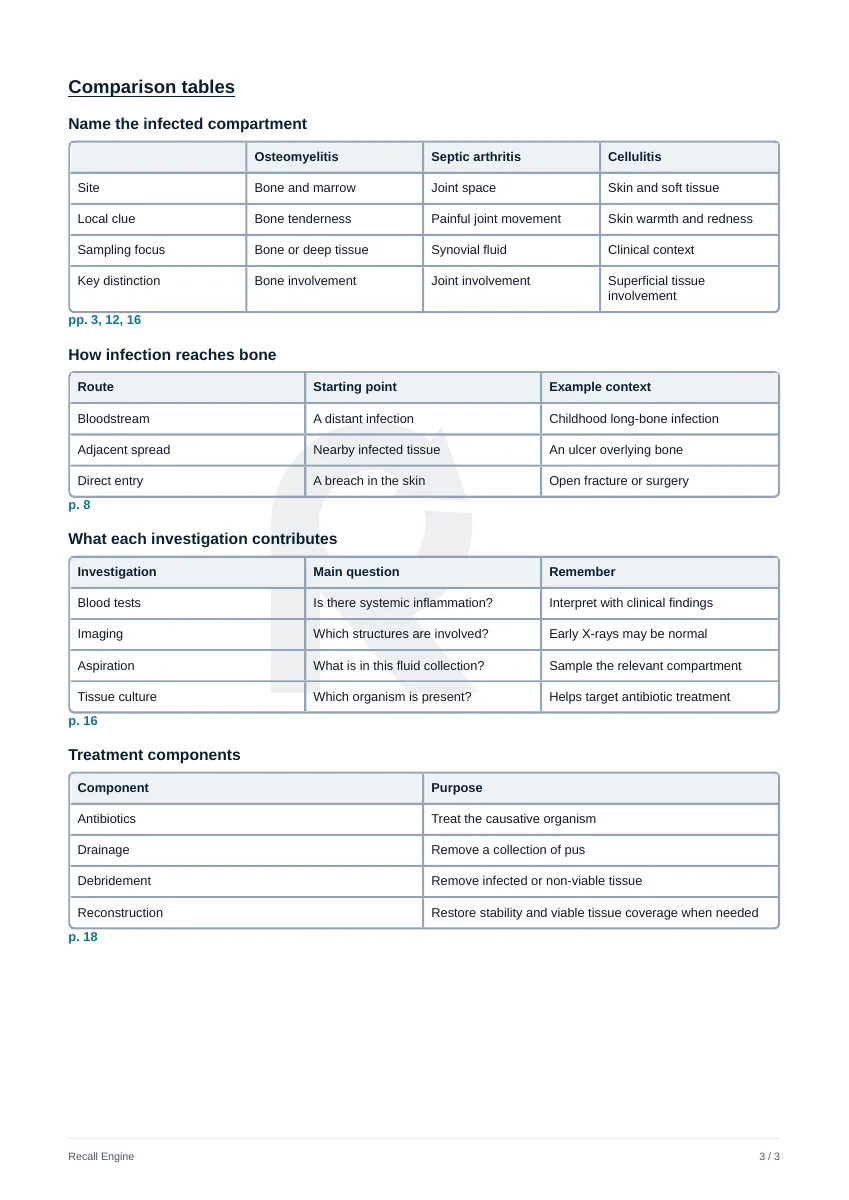
Built from the “Name the infected compartment” and “What each investigation contributes” tables on page 3 of a public sample reference sheet. This is a teaching example rather than clinical advice.
Practise without uploading
The prepared question bank runs from the preclinical sciences to the clinical specialties. Every question explains every option.
How it works
Upload your lecture
Add a lecture PDF up to 100 MB.
Select your pages
Choose the pages to condense.
Get structured notes
Source-linked high-yield notes organized by topic.
Why students use it
- Keeps only the testable, high-yield points
- Structured by topic so notes are easy to revise
- Every point traces back to a source page you can verify
- Free to start: 50 credits on signup with no card required
Frequently asked questions
Another question?
support@recallengine.appCan AI take notes and summarise my lectures?
Yes. Recall Engine is an AI note taker that turns your own lecture PDFs into high-yield notes and summaries, keeping only the points most likely to be tested and linking each one to its source page so you can verify it.
Can I make notes from a PDF?
Yes. Upload a lecture PDF, select the pages, and Recall Engine produces structured high-yield notes. Both text-based and scanned PDFs are supported.
How are high-yield notes different from flashcards?
Notes give you an organised overview to read and consolidate, while flashcards test recall one idea at a time. Many students make notes first then generate flashcards from the same lecture.
Is it free?
You get 50 credits free on signup with no card required and credits are only used after a successful generation.
How do I know the notes didn't cut something important or get a fact wrong?
Every point in the notes is tagged with the source page it came from so you can jump back to the original slide and check it in seconds. Treat the output as a study aid built from your own lecture, not an authority, and verify anything that feels off before you commit it to memory. If you think the summary trimmed too much, re-run it on a narrower page range to keep more detail.
Does it work on scanned or handwritten lecture notes?
Scanned PDFs work, since the lecture is read visually rather than relying on a clean text layer. Clear handwriting can be picked up too but messy or low-contrast handwriting is hit or miss so for handwritten material it helps to check the notes against your pages using the source-page links.
Should I make my own notes or just use a condensed bank like a ready-made summary?
Pre-made summaries are written for a generic syllabus, while these notes are condensed from the exact lecture your faculty set so the emphasis matches what your exam is likely to ask. They are a fast first pass to read and consolidate, not a replacement for active recall so many students generate the notes then turn the same lecture into SBAs or flashcards to actually test themselves.
Try it on your next lecture.
50 free credits for your own lectures.